Texas Instrument has made a software to sniffer BLE traffic with its device
 JaneYu 2015-05-05 20:51:10 107 Views55 Replies
 Texas Instrument has made a software to sniffer BLE traffic with its device
Hi. I bought some Bluno beetles and a USB BLE link module then I've connected each other and done Serial communication with baud rate,115200. But it's BLE communication range is too short.It can't communicate well when they are far away over 1m.
I want it to communicate over about 3m. How can I solve this problem??
JaneYu Hi guys,
Could you confirm the following is the correct and latest firmware for the following items -
- Bluno Link / SKU:TEL0087 / SBL_BlunoV1.97.bin as found on GitHub at - http://bit.ly/2A5DDSO
and
- Bluno Bee / SKU:TEL0073 / SBL_BlelinkV1.97.bin as found on GitHub at - http://bit.ly/2A5DDSO
______
Am finding it impossible to upload arduino sketches from Bluno Link USB to the Bluno Bee xBee attached to my Romeo V2 R3 Arduino Leonardo board so i need to confirm i've got the right firmware please.
Cheers,
Michael.
JaneYu void setup() {
Serial.begin(115200); //initial the Serial
}
void loop(){
if(Serial.available()){
Serial.write(Serial.read()); //send what has been received
Serial.println(); //print line feed character
}
}
This code is sending data from one end to another, if you want to send data from code, you can just use Serial.println() to print it, since when you write something in serial, it will send directly through Bluetooth.
JaneYu Can u guys comment on Why "Serial.available()" is always giving a Boolean false. Although Bluno Link and Bluno nano are paired.
JaneYu Hi,
I am able to do the wired/wireless programming on bluno nano when it is not connected to the circuit. I have to unplug it from the circuit in order to program it now. Any idea on what could be possible reasons. ?
Error is "avrdude: stk500_recv(): programmer is not responding"
JaneYu I don't think the bluetooth can communicate with Arduino mkr fox 1200, if you want to use bluetooth, why don't you try our Bluno?
JaneYu Did you try to do wireless uploading? after set the dongle as the central and the board as the peripheral, they should be paired and then choose the right board, you can upload the code wirelessly.
JaneYu i am trying the wireless uploading but not able to pair my both device.getting this
avrdude: ser_open(): can't open device "\\.\COM4": The system cannot find the file specified.
Problem uploading to board. See http://www.arduino.cc/en/Gu... for suggestions.
Hi ,
I already purchased couple of Bluno nano v 1.4 . I am thinking of pairing them to my Ubuntu 16.04 system.Are they compatible ?
JaneYu Hi ,
I already purchased couple of Bluno nano v 1.4 . I am thinking of pairing them to my Ubuntu 16.04 system.Are they compatible ?
JaneYu How does this module work with MAC? What do you need to install to make it work?
JaneYu Yes, you can. Just plug this module in USB port, and install the UNO driver, it will work.
Hello,
I haven't found any Terminal Android apps able to get connection with my Bluno. May you advice one Android app in particular that is full compatible with ?
Regards
JaneYu Hello,
The BlunoBasicDemo works fine.
Nevertheless I can't get a connection using my ble terminal wirh this uuid
Unknown service 0000dfb0-0000-1000-8000-00805f9b34fb
Unknown characteristic 0000dfb1-0000-1000-8000-00805f9b34fb
Unknown characteristic 0000dfb2-0000-1000-8000-00805f9b34fb
What's wromg ?
Regards.
Herve
JaneYu If you want to connect your Android phone to bluno device, there are BlunobasicDemo, SPP Bluetooth Serial Apps for connecting Bluno
JaneYu Ok thank you for your indications.
Now I am trying to buy the Bluno Link....is this the product?
https://www.dfrobot.com/pro...
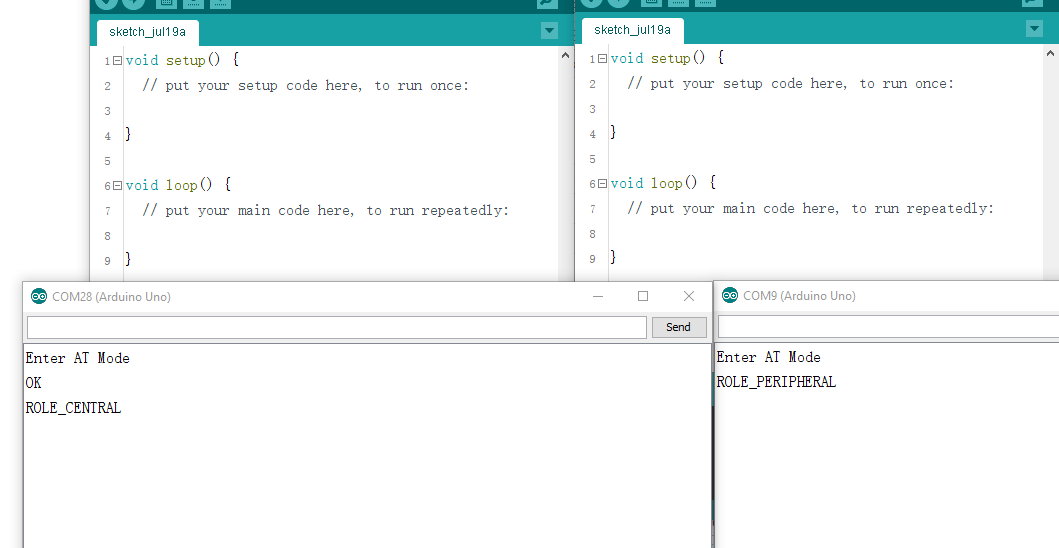
JaneYu Since you can set the mode through AT command, you can open the serial monitor at the same time, and the dongle and the beetle should have their own COM https://uploads.disquscdn.c...
JaneYu I can set the mode through AT command only on the Beetle connected via USB cable...
On the contrary, if I plug only my dongle without any bluetooth connection, two serial ports appear in my IDE (COM3 and COM4) and when I try to open them, the following message appear:
Errore nell'apertura della porta seriale "COM4" (Port busy)
processing.app.SerialException: Errore nell'apertura della porta seriale "COM4"
I have tried to plug and the unplug the dongle several times and besides to use a different version of the IDE (1.6.0 and 1.6.7) but the error is always the same
There is a possibility that the serial port is occupied, try to unplug the dongle and beetle, restart your IDEs, or use different IDE versions
JaneYu I was using the last update of the version of the IDE.
Now I am using the 1.6.0 version and there is the same problem, but this time the error is explicated as below. Please help me, I am doing a project for my Master Thesis and I am stucked with this stupid problem of "busy port". Below the error:
processing.app.SerialException: Errore nell'apertura della porta seriale "COM3"
at processing.app.Serial.<init>(Unknown Source)
at processing.app.Serial.<init>(Unknown Source)
at processing.app.SerialMonitor$3.<init>(SerialMonitor.java:94)
at processing.app.SerialMonito...(SerialMonitor.java:94)
at processing.app.Editor.handleSerial(Editor.java:2536)
at processing.app.EditorToolbar.mousePressed(EditorToolbar.java:357)
at java.awt.Component.processMouseEvent(Unknown Source)
at javax.swing.JComponent.processMouseEvent(Unknown Source)
at java.awt.Component.processEvent(Unknown Source)
at java.awt.Container.processEvent(Unknown Source)
at java.awt.Component.dispatchEventImpl(Unknown Source)
at java.awt.Container.dispatchEventImpl(Unknown Source)
at java.awt.Component.dispatchEvent(Unknown Source)
at java.awt.LightweightDispatcher.retargetMouseEvent(Unknown Source)
at java.awt.LightweightDispatcher.processMouseEvent(Unknown Source)
at java.awt.LightweightDispatcher.dispatchEvent(Unknown Source)
at java.awt.Container.dispatchEventImpl(Unknown Source)
at java.awt.Window.dispatchEventImpl(Unknown Source)
at java.awt.Component.dispatchEvent(Unknown Source)
at java.awt.EventQueue.dispatchEventImpl(Unknown Source)
at java.awt.EventQueue.access$200(Unknown Source)
at java.awt.EventQueue$3.run(Unknown Source)
at java.awt.EventQueue$3.run(Unknown Source)
at java.security.AccessController.doPrivileged(Native Method)
at java.security.ProtectionDomain$1.doIntersectionPrivilege(Unknown Source)
at java.security.ProtectionDomain$1.doIntersectionPrivilege(Unknown Source)
at java.awt.EventQueue$4.run(Unknown Source)
at java.awt.EventQueue$4.run(Unknown Source)
at java.security.AccessController.doPrivileged(Native Method)
at java.security.ProtectionDomain$1.doIntersectionPrivilege(Unknown Source)
at java.awt.EventQueue.dispatchEvent(Unknown Source)
at java.awt.EventDispatchThread.pumpOneEventForFilters(Unknown Source)
at java.awt.EventDispatchThread.pumpEventsForFilter(Unknown Source)
at java.awt.EventDispatchThread.pumpEventsForHierarchy(Unknown Source)
at java.awt.EventDispatchThread.pumpEvents(Unknown Source)
at java.awt.EventDispatchThread.pumpEvents(Unknown Source)
at java.awt.EventDispatchThrea...(Unknown Source)
Caused by: jssc.SerialPortException: Port name - COM3; Method name - openPort(); Exception type - Port busy.
at jssc.SerialPort.openPort(SerialPort.java:164)
... 37 more
Hi everyone! I am trying to connect my Bluno Beetle to my PC (windows7) using a CSR Dongle BLE 4.0.
My goal is to see data sent from the Bluno Beetle on the Arduino Serial Monitor over bluetooth connection.
When I try to open serial monitor I have this error:
Error during opening serial port "COM4" (Port busy)
How can I solve this issue?
My firmware version is 1.97 and the Bluno Bettle is set as PERIPHERAL
JaneYu Hi
You need to open different Arduino IDE, then the Beetle and the Dongle would have their own serial monitor to communicate
Hi here is a link, maybe you can make a reference: https://www.dfrobot.com/for...
JaneYu