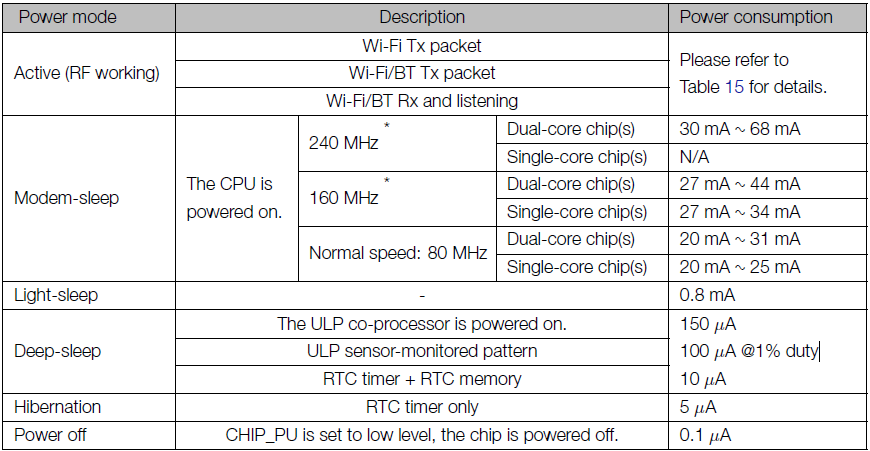
What is the power consumption of Beetle ESP32? Does it support deep sleep? What is the power consumption when it is in deep sleep?
 JaneYu 2019-06-18 18:23:26 30 Views19 Replies
 What is the power consumption of Beetle ESP32? Does it support deep sleep? What is the power consumption when it is in deep sleep?
Hi there,
I'm currently doing a project and I'm getting this error on Arduino. I connected to my Fire Beetle ESP32 to MPU6050. My code works and everything but I'm getting this error in Serial Monitor
flash read err 1000 esp32 Arduino
What can I do to resolve this message?
Thanks,
Anthony.
JaneYu Can I solder a Lipo battery onto this board and charge it with the microUSB?
JaneYu Sorry, this board do not have battery charging circuit, so you can not charge the battery via this board.
However, you can try Beetle CM-32U4, this one support battery charging.
https://www.dfrobot.com/pro...
What is the thickness of this board? I am trying to compare between this and the ESP32-C3 one
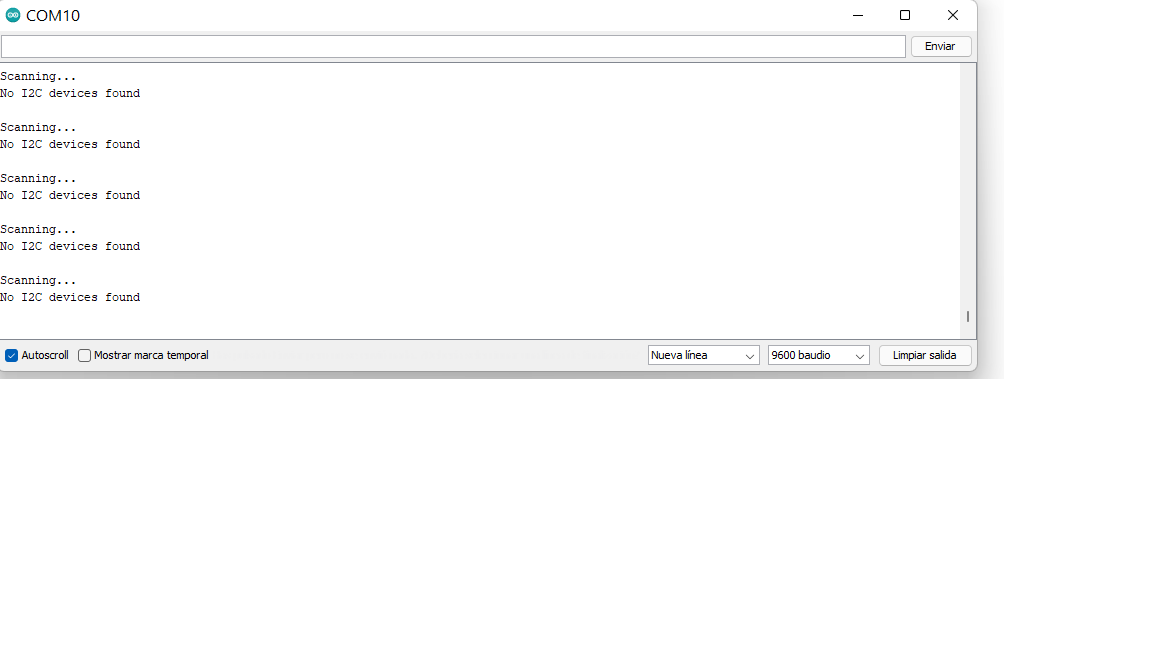
JaneYu Hello, I bought this module; however, when uploading any program with Arduino using the I2C communication protocol, it does not work. As an example, when I use this simple program to get the I2C addresses.
#include <wire.h>
void setup()
{
Wire.begin();
Serial.begin(9600);
while (!Serial); // Leonardo: wait for serial monitor
Serial.println("\nI2C Scanner");
}
void loop()
{
byte error, address;
int nDevices;
Serial.println("Scanning...");
nDevices = 0;
for(address = 1; address < 127; address++ )
{
// The i2c_scanner uses the return value of
// the Write.endTransmisstion to see if
// a device did acknowledge to the address.
Wire.beginTransmission(address);
error = Wire.endTransmission();
if (error == 0)
{
Serial.print("I2C device found at address 0x");
if (address<16)
Serial.print("0");
Serial.print(address,HEX);
Serial.println(" !");
nDevices++;
}
else if (error==4)
{
Serial.print("Unknown error at address 0x");
if (address<16)
Serial.print("0");
Serial.println(address,HEX);
}
}
if (nDevices == 0)
Serial.println("No I2C devices found\n");
else
Serial.println("done\n");
delay(5000); // wait 5 seconds for next scan
}
JaneYu I am experiencing very bad WiFi signal with a couple of Beetle ESP32 V1.0 that I bought.
I have so far powered with from USB _or_ with 3 x 1.5V AA battery pack. The Beetle only sees the 2 SSIDs that I have in the house, if they are within 3 meters direct line of site. RSSI is -80. The moment I go to approx 5 meters or more, the WiFi signal is so bad that the Beetle loses connection and cannot reconnect. The best RSSI ever is -73 if the Beetle is literally next to the WiFi router.
What to do? Is this a design issue? Software? Power issue? Anybody else experiencing this?
Other that the WiFi being bad, the board is working fine and it is stable.
Thanks!
JaneYu You can get more information from the "More Ducuments", here is user Manual.
Hi, the schematic for this product shows SPX3819M5-3.3 as voltage regulator having voltage input range of 2.5 to 16 V for input. Based on the voltage regulator I can use 15V input for supply voltage, correct? thanks
JaneYu Hey, after double checking, the supply voltage must be between 3.5V and 6.5V for this product even with the above voltage regulator.
Beetle ESP32 Microcontroller
I received this message when I tried to upload my program with Arduino Software 1.8.10:
An error occurred while uploading the sketch
A fatal error occurred: Failed to connect to ESP32: Timed out waiting for packet header
I tried to keep the boot buitton pressed but it doesent work.
It is configured in Arduino software as - Board: FireBeetle-ESP32
If I go on windows 10 device setting the port4 is configured as Arduino Uno.
Can you help me plz?
JaneYu Could you relate this issue over to [email protected] and they can better assist you. Thanks!
Hey,
The board has hardware SDA and SCL ports that you can directly connect to. This will allow you to directly interface with the i2C communication protocol. Please check out the product wiki here: https://wiki.dfrobot.com/Be...
JaneYu ESP32 supports deep sleep with power consumption of 30 to 68 mA in normal sleep mode and 100 uu@1% duty in deep sleep mode.
https://uploads.disquscdn.c...
JaneYu I had bought Beetle Bluno, and then I had learned that its software dos not support deep sleep. SI I could not use it. Is there any problem like this in Beetle ESP32? Can I put it into deep sleep mode easily by the help of Arduino IDE? If yes, can you provide us a complete example code and some current measurement that really show us that it is working? After Beetle Bluno experience, I become a little bit conservative. Thank you.
I have a Beetle (DFR0575) that I want to use in a battery powered configuration (3xC batteries ~ 4.5 volts) running Micropython. When I put the Beetle in deepsleep it still draws 3.5 - 4.5 mA. I have created a minimal main.py (listed below) and tried this MicroPython 1.16 and 1.17 but it never gets down to the uA level shown in the table. The 'boot.py' is the default with only comments.
After some more checking/testing I was running the battery input in through the microUSB port. When I connected the battery to the solder points directly on the board the current dropped to 0.3 mA when I put it in deepsleep. It seems that the microUSB interface is what is continuing to draw power even if the esp32 is in deepsleep.
import machine
import time
CYCTIME=10
print("Starting")
time.sleep(CYCTIME)
print("Going to sleep")
machine.deepsleep(CYCTIME * 1000)