I've had the Maqueen Plus for a little over a week and I'm really enjoying it. I've setup a small tutorial page here: http://wagnerstechtalk.com/... where you can learn more about...
 JaneYu 2020-07-25 13:50:38 46 Views21 Replies
 I've had the Maqueen Plus for a little over a week and I'm really enjoying it. I've setup a small tutorial page here: http://wagnerstechtalk.com/... where you can learn more about my experiences with it. For the price, I think it's a great buy, much cheaper than other kits I've used in the past which cost several hundred dollars. I do want to try some more advanced scenarios such as blutooth, I2C communications and perhaps the Huskylens in the future. But for now, definitely happy with this little robot and hope the page above is helpful to someone considering it.
Hello, on this pages there is no documentation regarding the maqueen plus v2. is it available?
JaneYu Hello, The Product wiki is all about tutorials and instructions for Maqueen Plus V2.
Hi,
I am programing DF Robot maqueen plus V2 with the ESP32 Mbits in the arduino IDE. Can anyone help me find an arduino library so i can create a simple program for line tracking using line tracking sensors and ultrasonic sensors? I only found a library for V1, but sensor alignment in different and i can not use the same library as for the V1 Robot.
JaneYu You need to use the version of the extension for the V2 of Maqueen Plus. It is not available in the "marketplace" and you have to provide its GitHub repository URL for installing it. It is included in the product description by the way.
Be prepared to browse the code to find detailed information about usage and use Google Translate a bit too because a lot of labels and hints, including the repo README, are written in Chinese ;)
JaneYu Hi,
Is the GitHub repository of the V2 extension actively maintained ? There is a PR done in Sep 2022 from a contributor proposing French translations, but it has not been integrated in the trunk yet, and the trunk code has evolved since then.
I'd like to volunteer for proposing changes too, mainly at the translation level and also for replacing the Chinese texts in the sources and README by their English translation so that far more people can exploit the work, but before investing time in such a not so exciting activity, I'd like to know if it would be useful or a waste of time.
BTW, is it planned that this version of the extension be available quickly in MakeCode the same way previous ones are ? The current method for adding it to a project is maybe OK for a developer but it is definitely not something the average educator will attempt.
Thanks in advance for any feedback.
JaneYu Hi,
Thanks for your interest in our products. We will consider your suggestion for makecode extension. We are reviewing Pull requests on github.
I found a sollution . I provided external power to huskylens and reduce screen brightness by a lot and it works . If there is another sollution please let me know :)
update :
Sollution 2. With reduced screen brightness and external power to microbit instead of huskylens it works better.
JaneYu Can Maqueen plus v1 provide 5v to huskylens through IIC ? I upgraded huskylens to firmware 0.5.1aNorm and it works with microbit with a shiled providing 5v. On maqueen plus huskylens power up but the same program dont run.
JaneYu hello DF Robot.
Programming the left motor of my Maqueen Plus is only possible in clockwise (backwards) direction , The motor does not react while programming in anticlockwise direction, How can I find the cause and effect of this (big) problem
kind regards
Rien van Harmelen
JaneYu Hi Daphne,
Sorry for the inconvenience.
Could you please reach us at [email protected] with details regarding your issue?
JaneYu What is the I2C command to clear / reset the motor counters?
JaneYu Hi Joseph,
Why would you like to reset the motor counters? What are you trying to achieve?
Hi Hope,
I am sorry I don't quite get your question. Maqueen can go straight but you will need to specify it in your program.
JaneYu Having similar problem with the Maqueen Plus V2: despite the same speed for both motors in the program, it doesn't move straight, but turning left a bit always (. It's annoying
Hi,
Where can I find information for programming the Maqueen Plus in micro-Python in a standard way, i.e. not from Makecode online tool ?
I've already done this for the micro:bit itself, using tools such as uflash and ufs and it works fine, but here I'm looking for either an already existing Python module for accessing to the Maqueen Plus resources (motors, sensors,...) or at least technical information for writing such one.
Any information would be appreciated ;)
Thanks in advance
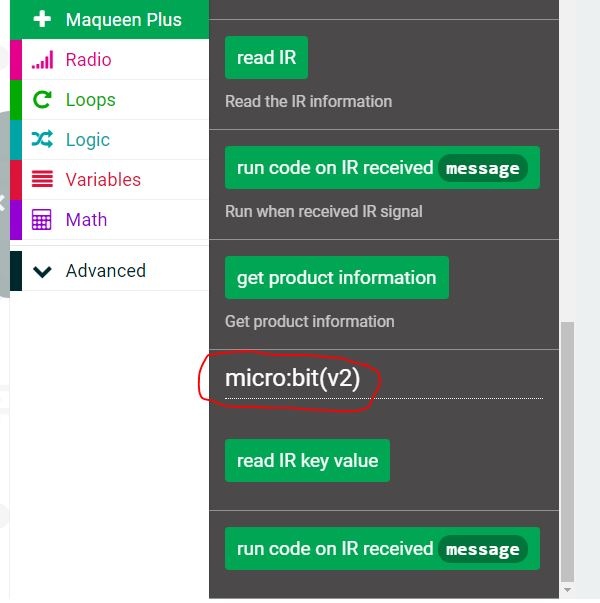
JaneYu Hi, I just tested the infrared sensor on my Maqueen Plus, and tried to read the codes from a IR remote controller, and display it on the micro:bit LED matrix, but it will not show me any number. Was anyone able to use IR sensor? Thank you.
JaneYu It works, just had to use the Micro:bit v2 IR function for MaqueenPlus. https://uploads.disquscdn.c...
Hi,
I just received and unpacked my Maqueen Plus but can't have the distance sensor (URM10 V1.0) work.
I've connected the green and blue wires to P1 and P2 respectively, and the black on GND of course. I've initially connected the red wire to one of the red pin on the I/O headers, but noticed after that it's labelled 5V on the sensor and Px are labeled 3V3. So I moved it to VCC on the headers block near the power switch. Is this correct ?
Anyway, the read block (configures for using P1 as trigger and P2 as echo) seems to output a 0 value whatever is in front of the sensor.
However, I've measured the voltage on the VCC pin and it's 4V give or take. Same value measured at the LiPo battery level). Is this enough to power the sensor, knowing that it's labeled with 5V on its connector ?
Any suggestion ?
Thanks in advance.
JaneYu If I want to use Plus RGB LEDs, what are the PINs on micro:bit? Arduino library has only Lite version LEDs supported.
JaneYu I want to get my students learning how to design their own 3d printed attachments for this robot. Is there a Fusion 360-compatible design that we can download for this robot?
JaneYu