I have a serial port, an error occurred. :(...Can not Find a Port in the Raspberry Pi.
 JaneYu 2015-01-22 14:41:14 40 Views79 Replies
 I have a serial port, an error occurred. :(...
Can not Find a Port in the Raspberry Pi.
Is there a suitable case for this shield and a pi4?
JaneYu We don't currently have a case that wraps the Pi4 and the shield, maybe you can use a raspberry pi case and add the shield
I want to read the pin status of my Raspberry Pi (4) with the Arduino. How do I know the correspondence between the pins?
JaneYu Hi, you could reference this link.
https://wiki.dfrobot.com/Ar...
Have you tested the compatibility with Raspberry Pi 4 Model B with this Shield?
JaneYu Can you link me to a guide for the wiring and the code? I've already tried different setup but i can't make it to work. Thanks!
Edit: Nvm, managed to make it work. For other people looking for the setup without USB, the wiring was just only the Tx and Rx pins connected to Rx and Tx pins of shield(X,Y), NO NEED for ground and 5V.
dev/ttyAMA0 = bluetooth
dev/ttyS0 = mini uart ( this is the one wired on the shield)
you can test first with minicom.
and for reading output on rpi, here's a tutorial that worked for me,
https://pimylifeup.com/rasp...
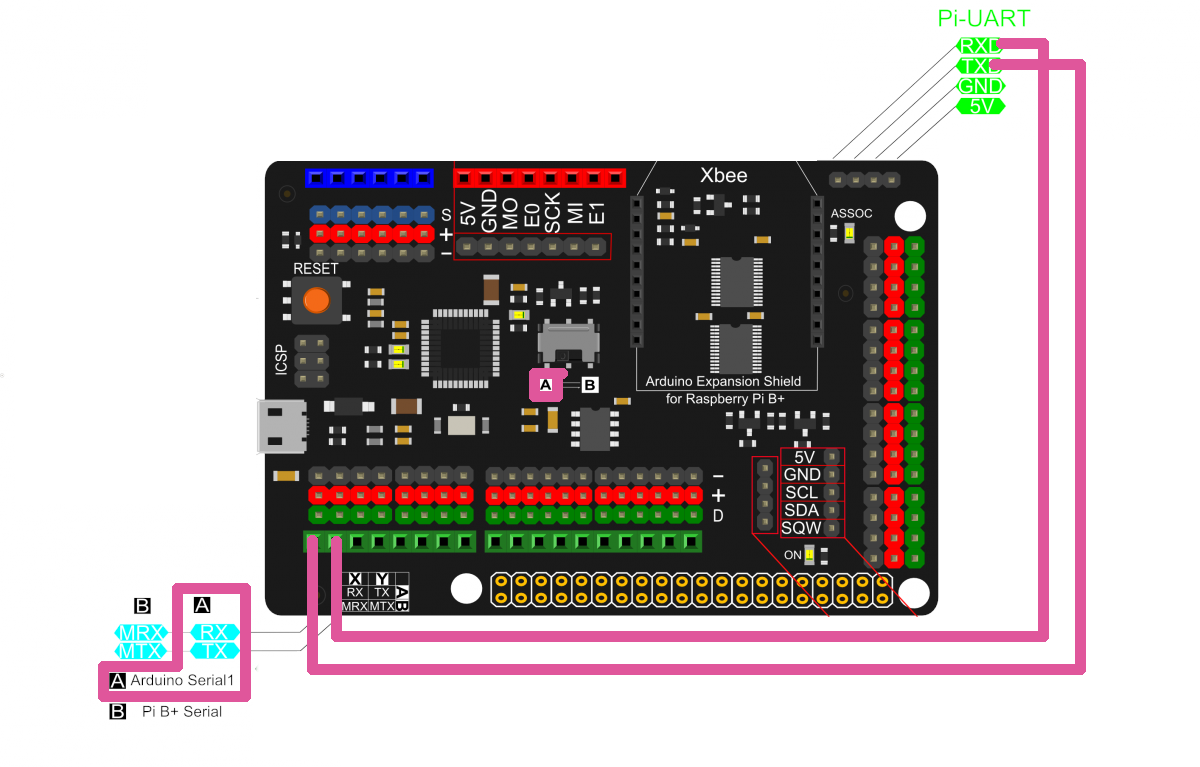
JaneYu For wiring the Arduino to the Pi Serial, you can use USB, or the serial pins, for Serial Pins, I put the serial switch in the A position, so the Arduino Serial was connected to the X and Y Pins. Then I connected X and Y to the PI-UART Header. X (RX) to Pi-TX and Y (TX) to Pi-RX. https://uploads.disquscdn.c...
For Code, On the Python Side I believe you need to enable Serial with enable_uart=1 in the config.txt then the pi serial port should be /dev/ttyS0 (at least on Pi 3). I've used pyserial before, so if you're using that, setup the code may look like:import serial
s = serial.Serial('/dev/ttyS0', BAUD_RATE)
c = s.read(12) #read 12 bytes from serial
print(c)
On the Arduino Side, this is an Arduino LEONARDO, not UNO, which means it has two serial ports. The Serial port on the Pins is Serial1, while the USB Port is Serial.
void setup() {
    Serial1.begin(BAUD_RATE);
  Serial1.print("Hello World");

}


void loop() {

}
Good Luck!
OK
Can You just write procedure of uploading GRBL.ino to DFR0327 leonardo wia arduino IDE on windows and what bootloader is in that 32u4 board?
Is better to upload wia Rpi or Windows?
JaneYu I have never done a project related to CNC, but it can be realized in principle.
JaneYu Is it posible to Connect a GBRL shield for CNC on It and which Version work on 324 chip?
Thanks
JaneYu So do you mean you didn't plug (stack the shield to pi tightly & connect usb ports) the shield to pi, instead you only connected the usb port? That way the GPIOs on pi will not be able to use from the shield.
JaneYu Bro the code I am using is the one on your wiki. I connected the micro usb from the pi to the shield. 5V and GND from the shield or from Raspberry to the relay. GPIO 4 on sheild to any channel on relay is not working .
I have wired it exactly as it is mentioned in your wiki
JaneYu I have read your video again. In the first paragraph of video, did you plug the shield to the raspberry pi?
I can't read the wiring in video.When you use the shield, do you power it?
JaneYu If you mean power with the micro USB connected to the raspberry pi then yes I di
When I used the example code to activate GPIOs there's is nothing coming from the shield. When I connect the relay to rapsberry pi the GPIO is giving signals
JaneYu I can't seem to get the GPIOs to work. I've connected using the provided usb cable and when I used the sample code to activate the GPIO while connected to the raspberry pi 3B+. What am I doing wrong?
JaneYu Can you change an USB cable, it need to transfer data.
hello, is there any video showing connection between rasp and this shield ?
JaneYu Hello. Is this shield acting like usb connection between Pi and Arduino?
JaneYu The arduino in shield and Pi communicated through serial.
im sorry my english is not good,but i hope u guys understand what im trying to ask. As i know this board(xbee) only act as interface which mean all the process still been done by rasp,and we all know rasp cannot read an analog input so if there analog input available at xbee board,what make it able to read analog signal?is there any adc on xbee board?
JaneYu I have a problem. I want to use the XBee connection to connect a XBee ZigBee board. Unfortunately, I am not able to transmit or receive any data. The XBee port seems to send no signal.
How can I use the XBee modules with your board.
BTW: I have the revision v2.0 but your schematic is about the version 1.
JaneYu Xbee is connect to ATMega32U4, can you enter Raspbian and use the Arduino IDE to test the Xbee function? Please also notice the serial used for XBee.
we will update the new schematic soon.
We are not sure if anyone has made a OneWire library for Windows IoT, you can test the library first.
JaneYu Windows IoT may not support OneWire.h library, you can read the sensor directly from Raspberry pi without this shield. Or you can use this shield to read the sensor value and send the data wirelessly to Windows IoT.
JaneYu