Question - Can you charge the a lipo that is attached to the battery input using the on board micro-usb?
 JaneYu 2016-10-10 02:26:48 12 Views60 Replies
 Question - Can you charge the a lipo that is attached to the battery input using the on board micro-usb?
I would like to know how precise is this device. Thank you for your answer.
JaneYu CurieNano and DFRobot Bluno products are completely different in configuring BLE.Select Arduino 101 to communicate with CurieNano
JaneYu Is there anything specific I have to do to run the board from the battery only? I uploaded a code and switched to battery but the board wont turn on. The board will work normally only if its plugged in to my computer usb
JaneYu We did not test the power consumption running the button led sketch, but I think the power consumption should be very small.
JaneYu Sorry, we don't have sample libraries for what you need. But I think you can refer to the information about bluetooth connection encryption.
JaneYu What is the power consumption of the board? working on a school project and I have to pick the smallest lightest battery I can find.
JaneYu In our tests, the blink program's power consumption was 40mA.
Re: previous discussion on the white ribbon connector
Thanks for the reply. Can you provide details on this ribbon socket please? Perhaps its part number/datasheet/product link?
We are trying to put the Curie Nano in an enclosure and expose the USB port to the external via a panel mount USB female socket. Something like this: https://au.rs-online.com/we...
So we would like to get a ribbon cable, one end put into the white ribbon socket, the other end soldered to the wires coming out from the panel mount USB.
Cheers
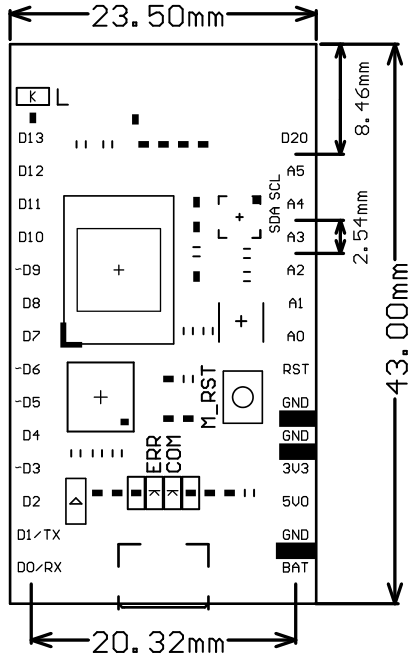
JaneYu The distance between each pin is 2.54mm like most of our boards. Please check if the poles distance diagram is good for your project. https://uploads.disquscdn.c...
JaneYu Hi,
This V2.0 Curie has been made some improvement in its stability of the power, and the white ribbon socket is to expand USB socket, which means both port could be used as the USB.
JaneYu Thanks for the reply. Can you provide details on this ribbon socket please? Perhaps its part number/datasheet/product link?
We are trying to put the Curie Nano in a enclosure and expose the USB port to the external via a panel mount USB female socket. Something like this: https://au.rs-online.com/we...
So we would like to get a ribbon cable, one end put into the white ribbon socket, the other end solders to the wires coming out from the panel mount USB.
Cheers
Hello. Where i can take mechnical drawing of this board ?
JaneYu Hi,
Sorry we don't have the mechanical drawing for this product, we just have the dimension of the board.
https://www.dfrobot.com/wik...
i followed this.
JaneYu You have successfully install the environment right? Can you see the COM port in the IDE?
Yea i did that but its in dfu mode. I would want it to be in com mode. So that i can upload the code through arduino. Kindly pls do let me know the procedure.
JaneYu Hi, sorry for the bad explanation, although Intel Curie support charge function, but it charges slowly, so we didn't develop the charging port for this CurieNano board, so actually, this board NOT support charging, sorry for the mistake.
JaneYu This should be OK, Did you connect right to the battery input? and is the CurieNano light up when plug in the usb port?
JaneYu Every time I tried the example HMC5883L_compass, the serial monitor always printed "Could not find a valid HMC5883L sensor, check wiring!". Same for all the CurieNano boards I bought. Curie IMU works well though. Does anyone know why?
JaneYu Hi, what is the voltage level of the digital I/O pins of CurieNano? is it 3.3 or 5V ? Thanks
JaneYu Hi
You need to use the BLE link dongle https://www.dfrobot.com/pro... work as the media between Bluno beetle and CurieNano, besides you also need to update the firmware of BLE link firmware, you can find the link and tutorial here:https://www.dfrobot.com/pro...
JaneYu hi,
can i use blunobasicdemo app to communicate with curienano instead of bluno?
JaneYu No, because the difference of the bluetooth protocol, blunobasicdemo is not support curienano, you can use an app called "Blynk" to connect to curienano (choose board Arduino 101)