I'm not able to get my Macbook Pro to connect to your proprietary iDrawing Pad using the classical IDE linked above. Your website doesn't appear to have any tech docs to try and tr...
 JaneYu 2017-07-25 20:42:09 113 Views10 Replies
 I'm not able to get my Macbook Pro to connect to your proprietary iDrawing Pad using the classical IDE linked above. Your website doesn't appear to have any tech docs to try and troubleshoot the connection/port issues and therefore is rendering this project un-useable. Not to mention that the included directions linked above are shaky at best.
I can not get it to compile using IDE1.0.5 i get the errors
C:\Program Files (x86)\Arduino\libraries\WeatherStation\WeatherStation.cpp:49: error: 'LiquidCrystal_I2C' does not name a type
C:\Program Files (x86)\Arduino\libraries\WeatherStation\WeatherStation.cpp: In member function 'void WeatherStation::init(DataConfig*, uint8_t)':
C:\Program Files (x86)\Arduino\libraries\WeatherStation\WeatherStation.cpp:198: error: 'lcd' was not declared in this scope
C:\Program Files (x86)\Arduino\libraries\WeatherStation\WeatherStation.cpp: In member function 'void WeatherStation::displayNext()':
C:\Program Files (x86)\Arduino\libraries\WeatherStation\WeatherStation.cpp:486: error: 'lcd' was not declared in this scope
C:\Program Files (x86)\Arduino\libraries\WeatherStation\WeatherStation.cpp: In member function 'void WeatherStation::processButton()':
C:\Program Files (x86)\Arduino\libraries\WeatherStation\WeatherStation.cpp:740: error: 'lcd' was not declared in this scope
C:\Program Files (x86)\Arduino\libraries\WeatherStation\WeatherStation.cpp: In member function 'void WeatherStation::disableBeforeSleep()':
C:\Program Files (x86)\Arduino\libraries\WeatherStation\WeatherStation.cpp:833: error: 'lcd' was not declared in this scope
C:\Program Files (x86)\Arduino\libraries\WeatherStation\WeatherStation.cpp: In member function 'void WeatherStation::enableAfterSleep()':
C:\Program Files (x86)\Arduino\libraries\WeatherStation\WeatherStation.cpp:881: error: 'lcd' was not declared in this scope
JaneYu I had issues getting compiled and uploaded using any single IDE version. I got it working using IDE 1.0.5 uploading the adjust then closing. Then, opening IDE 1.8.5 and up loading the weather example. Barometer needs calibrated or fix as it reads -563 hPa. Fun tho for first dealing with anything arduino.
running debian 4.4
JaneYu Could you check the version of the Kit, if the Barometer is BMP085, then 1.6.x or above IDE may have problem to upload code. You don't need to calibrate the sensor before using it.
Hello,
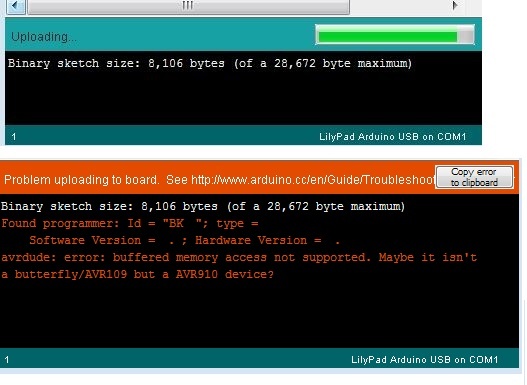
I had a problem uploading the 3231 example.
The simple answer is that I didn't have the correct serial/com port selected in the IDE.
The problems symptoms were that the code would compile quickly and without error [top picture]. Then when the IDE began to upload an error was displayed [bottom picture] .
I was able to upload successfully once I changed the Com port in the IDE to correspond with the one set in Device Manager.
I just needed to select the correct Com port and then close and reopen the IDE to verify all was still set properly.
From the start I should have verified which serial port / com port the Device Manager had assigned the Arduino LilyPad USB (iDrawing-Pallette v1.0) used in this project. While the instructions do mention checking the serial port driver in Step 7 it only seems to be related to the Arduino IDE not the operating system device manager.
In my situation the IDE was trying to use Com1 and the Windows Device Manager was using Com6. I changed the IDE to Com6 and example uploaded without issue.
JaneYu I cannot get the Weather Station or any examples to load on the controller board. I am using the 1.0.6 IDE software.I get an error before any of the examples finish loading. The LED never lights on the controller board. Is it possible the controller in the kit is bad, and how can I get it replaced? i was hoping to use this in a classroom.
JaneYu What's the error message showed, and is the board shown in the PORT part in the device manager?
Your serial port can't detect the board? we can make a tech doc based on the issues provided
JaneYu The manual says the IDE version should be at least 1.0.5. Make sure you put the .cpp code in the right library file, and try to re-open the IDE
JaneYu