Hi,
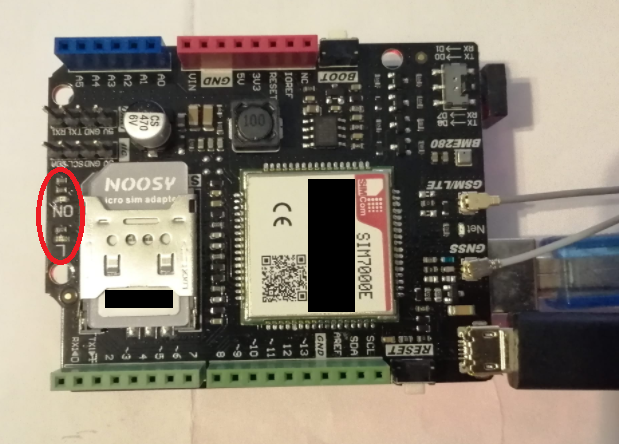
I'm having trouble getting the DFR SIM7000E and the Adafruit Metro M4 Airlift working together:
- When I stack the SIM7000 on top of the Metro M4 (as intended), the M4
won't boot properly or show up as CIRCUITPY drive on the PC, when
connected per USB. No serial connection is established. Arduino IDE
won't find the board either.
- If I don't stack and wire the SIM7000 manually, the M4 will show up as CIRCUITPY and I can use Mu
editor or Arduino IDE. But no output on the serial console.
Pin config:
M4 VIN (12V)/GND -→ SIM7000 VIN/GND
M4 RX/D0 -→ SIM7000 D8 (or D0)
M4 TX/D1 -→ SIM7000 D7 (or D1)
 JaneYu
 We have not tested this shield on the Metro M4, so we cannot guarantee compatibility.
But since this shield communicates through the serial port, we recommend that you check whether the Jumper Cap is installed normally.
In my case I have still echo mode and receiving from serial exactly what I sent. I tried "ATE0\\r\\n" like in your example but it doesn't work
JaneYu If I want to use this module for a project where I have to move it, what elements to supply power should I use? What battery and module that you sell can you offer me? I want to track my car but not using solar panel
JaneYu Hi, What voltage is used to power your car? We generally use 7.4V lithium battery or 18650 power management module as mobile power supply.
https://www.dfrobot.com/pro...
Is it possible to use the USB interface for communication, sending AT commands and getting data?
I would like to connect it to a linux computer via USB and use wvdial, is this possible?
JaneYu Hi trebla,
Please make sure the SIM operator's frequency bands is compatible with SIM7000E.
JaneYu Hi, I'm from US and I'm about to design a project using the Verizon network. I notice that Verizon works on: B2 / B4 / B13. And looks like the SIM7000A have that config. Where can I buy the SIM7000A version ? Here just allow me to buy the SIM7000C and SIM7000E versions!
Here is the source of Verizon network capabilities:
https://www.cellmapper.net/...
https://opendevelopment.ver...
Thank you !
JaneYu Hi,
I have a problem when I connect the LTE-shield to an external powerbank (7V-12V), and the arduino plugged in the computer, appears in the monitor serial the following:
Turn ON SIM7000......
(I tried to plug it to another powerbank and nothing)
When I connect it,any led is ON in the shield, anyone have this problem?
But if I press the Reset button the Led "L" blink in color blue.
JaneYu Hi there,
Sorry for the late reply.
Try to use these command to check if your area has signal.
AT+CNMP=2 - singnalstrength=20 Attach service
AT+CNMP=13 - signalstrength=20 Attach service
AT+CNMP=38 - signalstrength=0 Fail to attach service
AT+CNMP=51 - signalstrength=0 Fail to attach servic
JaneYu Unable to share code it to long. I'm getting server error when I try to post it....
JaneYu Dears we are trying to run the code with a common SIM CARD LTE, but fail to attaching service.
Is necessary to have a Sim card with LTE cat M? DO we need to have credit in the sim card to stablish de service?
What exactly the code makes, send a message to a taobao server??
Thank you.
JaneYu Hi.
i bought the dfrobot sim7000e and i want to understand which ports to use with mega 2560 arduino .
on the example ,you defined tx 7 and rx 8 and on the board, they indicated that tx 8 and rx is 7 is used!
which ports do i use when using atmega 2560?.
thank you.
JaneYu We have two module, 7000E for Quad-Band FDD-LTE B3/B8/B20/B28, 7000C for Quad-Band FDD-LTE B1/B3/B5/B8. So if it is not in this band, it is not available.
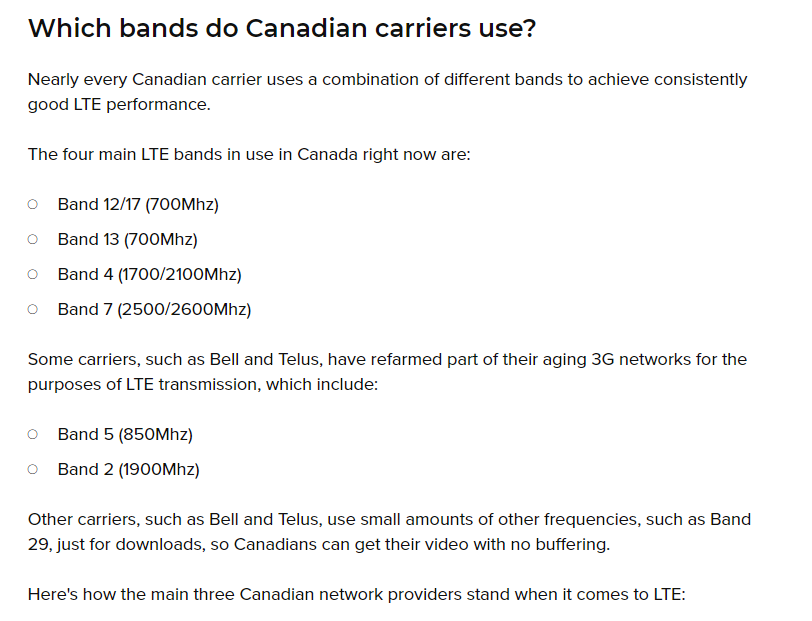
JaneYu I am in Calgary, Alberta, Canada. Will the SIM7000E work for me? I read it somewhere DFRobot that I should be using SIM7000E but looking though the Canadian service providers list, I should be using SIM7000A. See screenshot below.
https://www.androidcentral....
https://uploads.disquscdn.c... https://uploads.disquscdn.c...
JaneYu @baskim : are you from India ? can i see your code ? . Im not able to turn on my SIM7000 at all !!!!
JaneYu I'm using Uno , followed all your instructions. Set the dip switch for tx rx to D7 & D8 as my TX RX.
Powered my arduino uno with my USB to PC. For the SIM LTE Module I powered using the micro USB connector, I get the ON LED to be Red.
Serial Monitor says "Turn On SIM7000" and then it just stays there.. What I'm I doing wrong ?
I have also checked my country telecom specification , they do provide support for Quad-band 850/900/1800/1900MHz, which this module supports.
Loaded your code into my UNO.
Code : /*
* File : DFRobot_SIM7000_ATtest.ino
* Power : SIM7000 needs 7-12V DC power supply
* Brief : This example use the serial port to send AT command to control the SIM7000
* With initialization completed, we can enter AT command to SIM7000 directly
* Common AT commands :
* AT+CPIN? : Check SIM card
* AT+CSQ : Check signal quality
* AT+CGATT?: Check net attached state
* AT+CSTT : Start net connect task
* AT+CIFSR : Get local IP
* Get the AT command table in Resource folder :SIM7000 Series_AT Command Manual_V1.01.pdf
* Note : If you use Mega please connect PIN8 PIN10 and set PIN_RX = 10
* The AT command must end with CRLF
*/
#include <wire.h>
#include <dfrobot_sim7000.h>
#define PIN_TX 7
#define PIN_RX 8
SoftwareSerial mySerial(PIN_RX,PIN_TX);
DFRobot_SIM7000 sim7000;
void setup() {
Serial.begin(19200);
while(!Serial);
sim7000.begin(mySerial);
Serial.println("Turn ON SIM7000......");
if(sim7000.turnON()){ //Turn ON SIM7000
Serial.println("Turn ON !");
}
Serial.println("Set baud rate......");
while(1){
if(sim7000.setBaudRate(19200)){ //Set SIM7000 baud rate from 115200 to 19200 reduce the baud rate to avoid distortion
Serial.println("Set baud rate:19200");
break;
}else{
Serial.println("Faile to set baud rate");
delay(1000);
}
}
mySerial.begin(19200);
Serial.println("For example, if you type AT\\r\\n, OK\\r\\n will be responsed!");
Serial.println("Enter your AT command :");
}
void loop() {
mySerial.listen();
while(mySerial.available()){
Serial.write(mySerial.read());
}
mySerial.flush();
while(Serial.available()){
mySerial.write(Serial.read());
}
}
JaneYu Hi, you need to reference our product wiki to achieve your goals.
JaneYu your product features poor documentation, and features only examples that relate to software serial implementation only which is known to have flaws in comparison to using hardware serial on a mega.
I ask again, is this product capable of hardware serial connectivity? Or do I avoid purchasing products from you in the future
I refer you to this discussion posted on the Ardiuno forum.
I already followed the steps provided in the wiki to try and ran it on a arduino, i am using power supply of 8V.
It still gets stuck at turnON sim7000.....
I have also tried all the other example codes none of them seems to be be able to to communicate with the module, i even tried a simple AT test using a arduino mega:
using the Serial3 of arduino mega
JaneYu