voice recorder stopped working after connecting via GPIO pins. Now even the record and play buttons are not working when I connect it with USB. I tried to flash it download_flash_sdk.bat but its giving error
Could Not Find C:\Users\iswit\Downloads\c94a2c269675e99b001dc73c1c7a805b\download\post_build\flash\no_isd_file
Press any key to continue . . .
What are my options?
 JaneYu
 I have an art project for which I would like to use this recorder/player. In stand alone mode would I be able to record 10 or more messages and be able to play them back randomly every time the play button is pressed? Or would I need a controller or software to set this up? And what tool would work best if so?
JaneYu I have problem with two modules. My and also another PCs are not able to find them via USB. I tried changing the cables but still nothing.
If someone know how to solve this i'll be grateful
JaneYu gpio rec and play pins have no documentation . can i use push button between those pins and ground (without any resistor)?
JaneYu You don't have to use any resistor to use the PIN(PLAY/REC)
Those PINS have the on-board resistor.
Hi,
This is good hardware but software have gaps:
Is there any option just to read the names of recorded files in the memory?
Can I read how many records exist?
How I can delete specific file(not that now played)?
Thanks
Alex
JaneYu Yes, you can, search for the chip AC6925A, the DF1101S is just without the Jieli branding. You need to flash the voice recorder firmware on it (the flashtool and firmware are on the DFRobot wiki). I forgot to mention, you program it by connecting to its USB. It would show up in Windows as "BR21 UBOOT1.00 USB Device". The chip is made for Bluetooth speakers (it has BT 5.0) but it looks like it's used as a voice recorder.
JaneYu Could you please share your serial monitor? This can help us diagnoise the problem.
Please notice that the default serial baud rate is 115200. It could cause by the wrong band rate setting
JaneYu I'm using module DF1101S with WIO terminal. All function off module are working very good with WIO. BUT my application need load record file send to server without using Type-C interface.
JaneYu Sorry, the file transimtion can only be execute via USB port. You can not do wireless transmission.
I am trying to control using arduino.
Firmware has been updated.
In music mode, MP3 files are played with the following command.
df1101s.playSpecFile(IMA_NOW); //IMA_NOW is the track number
When I wanted to stop playing an MP3 file with this command, I sent the following command, but I could not stop it.
df1101s.pause();
What command should I send if I want to stop during playback?
JaneYu Thank you very much for your information.
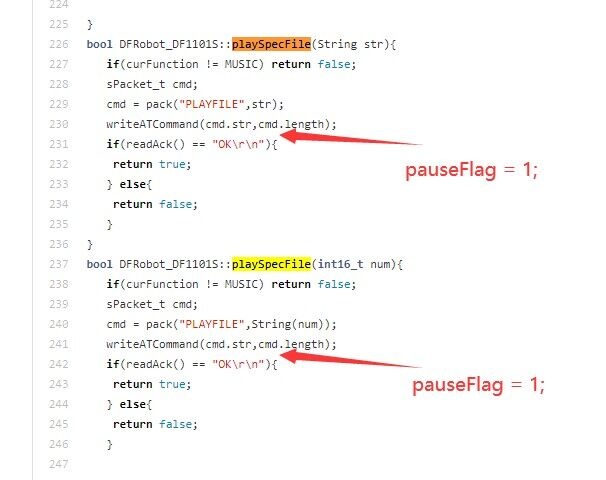
I have tested this issue and got the same result. Seems that the .pause() function only work for music play by.start() function.
I have reported this problem to the product manager, and we will fix this problem soon.
Hi
The product manager conformed that their is some mistake in the library, see the picture attached below.
We will update this library soon. https://uploads.disquscdn.c...
I am trying to burn the firmware update for the Voice Recorder module DFR0745 using a PC, but without success. Can anyone help? Without the firmware update these modules malfunction.
The commands from the cmd.exe window (below) show how the firmware is failing for me when I double-click on the "download_flash_sdk.bat" file as instructed by the DFR0745 Product Wiki page.
These Voice Recorder modules are great – I've bought 20 of them for a research project. Unfortunately, they malfunction without this firmware. However, the firmware also appears to be faulty – at least when I'm using a PC running Windows 10 version 20H2, OS build 19042.1348
If anyone has any suggestions as to what I can do, they will be gratefully received.
Thank you.
C:\Users\j.hardstaff\Documents\download\download>cd  C:\Users\j.hardstaff\Documents\download\download\


C:\Users\j.hardstaff\Documents\download\download>set EXE_NAME=sdk


C:\Users\j.hardstaff\Documents\download\download>set OBJDUMP=C:\JL\pi32\bin\llvm-objdump


C:\Users\j.hardstaff\Documents\download\download>set OBJCOPY=C:\JL\pi32\bin\llvm-objcopy


C:\Users\j.hardstaff\Documents\download\download>cd ../post_build/flash


C:\Users\j.hardstaff\Documents\download\post_build\flash>REM echo sdk


C:\Users\j.hardstaff\Documents\download\post_build\flash>REM echo C:\JL\pi32\bin\llvm-objdump


C:\Users\j.hardstaff\Documents\download\post_build\flash>REM echo C:\JL\pi32\bin\llvm-objcopy


C:\Users\j.hardstaff\Documents\download\post_build\flash>REM C:\JL\pi32\bin\llvm-objdump -disassemble sdk.exe > sdk.lst


C:\Users\j.hardstaff\Documents\download\post_build\flash>C:\JL\pi32\bin\llvm-objcopy -O binary -j .text  sdk.exe  sdk.bin

The system cannot find the path specified.


C:\Users\j.hardstaff\Documents\download\post_build\flash>C:\JL\pi32\bin\llvm-objcopy -O binary -j .data  sdk.exe  data.bin

The system cannot find the path specified.


C:\Users\j.hardstaff\Documents\download\post_build\flash>C:\JL\pi32\bin\llvm-objcopy -O binary -j .nvdata sdk.exe  nvdata.bin

The system cannot find the path specified.


C:\Users\j.hardstaff\Documents\download\post_build\flash>C:\JL\pi32\bin\llvm-objdump -section-headers  sdk.exe

The system cannot find the path specified.


C:\Users\j.hardstaff\Documents\download\post_build\flash>copy sdk.bin/b + data.bin/b + nvdata.bin/b sdk.app

The system cannot find the file specified.


C:\Users\j.hardstaff\Documents\download\post_build\flash>call download.bat sdk C:\JL\pi32\bin\llvm-objdump C:\JL\pi32\bin\llvm-objcopy

********************************************************************************

                                AC692x Download  ...

********************************************************************************

03/01/2022

0.mp3

1.mp3

2.mp3

3.mp3

4.mp3

5.mp3

6.mp3

7.mp3

8.mp3

9.mp3

bt.mp3

connect.mp3

conn_hid.mp3

disconnect.mp3

discon_hid.mp3

echo.mp3

linein.mp3

low_power.mp3

music.mp3

pc.mp3

power_off.mp3

power_up.mp3

power_up1.mp3

radio.mp3

record.mp3

ring.mp3

rtc.mp3

wait.mp3

warning.mp3

       29 file(s) copied.

F_ASCII_S.PIX

F_GB2312.TAB

F_GB2312_S.PIX

menu.res

ui_sty.sty

        5 file(s) copied.

Device offline, only package the file.

SPI nor flash online


Output binary file name: jl_isd.bin

Output binary file size: 0x45000(276K)

Request minimum flash size: 0x80000(512K)

flash_base: 0xe5c0

sys_cfg_file_addr: 0x447c0

sdfile_head_addr: 0x36000

cfg_zone_addr: 0x36260

cfg_zone_size: 0x40

reserve_zone_addr: 0x447c0

reserve_zone_size: 0x80000


protected_range: 0x1

spi_run_mode: 0xa10a

spi_div: 0x5


pll_sel: 0x0

osc_freq: 24000000Hz

osc_src: 0x0

osc_hc_en: 0x1

osc_1pin_en: 0x1


Device block num: 0x8

Device block size: 0x10000 Byte

Device capacity: 0x80000 Byte


make flash image ok


????????

??FW???jl_isd.fw


Could Not Find C:\Users\j.hardstaff\Documents\download\post_build\flash\no_isd_file

Press any key to continue . . .
JaneYu Good day,
How do I switch from slave mode to PC mode on the DFR0745?
JaneYu You can use AT function to fulfill this function.
AT+FUNCTION=1
bool switchFunction(eFunction_t function); can also do the same job.
I am trying to burn the firmware update for this module using a PC, but keep getting the same fail message, as follows: "Could Not Find C: \Users\…\Documents\download\post-build\flash\no_isd_file" Can you help? Without the firmware update these modules will not function reliably.
JaneYu To my great disappointment, I have found this module to be unreliable. Sometimes it records, sometimes it doesn't. Sometimes it plays a recorded file, sometimes it doesn't. I see (from looking at FAQ section of the product wiki page) that you provide a firmware update in case, as you say, 'your module cannot record sound properly'. You provide the firmware in the form of a bat file which cannot run on a Mac (I'm on macOS Catalina 10.15.7). Can you provide the firmware in a format that runs on a Mac or do you know of a way that I can get the bat file firmware burning onto the module connected by USB to my Mac?
JaneYu I am trying to burn the firmware update for this module using a PC, but keep getting the same fail message, as follows: "Could Not Find C: \Users\…\Documents\download\post-build\flash\no_isd_file" Can anyone help? Without the firmware update these modules will not function reliably.
Hey, you here again, long time no see !
I was planning to use this module again but yes, it is unreliable AF.
Mine started playing some random radio channel today, unbelievable. It's picking up RF signal from the air
Can't get it to work with AT command, only works with ARDUINO Library
Greeting!
After current recording. After a short recording (5-30sec), can playback start immediately? What is the break time that occurs? (What is the save time?)
With buttons or Arduino command ... ??
In front of and behind the current recording, can I start a beep sound recorded with a short timeout (pre-recorded)? What is the break time that occurs?
I don't want a long break or shift noise! Possible?
We want to build a controlled, replay device.
Now I am planning to purchase.
Thanks for the reply!
JaneYu All the files I record with this module carry a Created date of '1 January 1970 at 01:00'. Is there anything that can be done about that? Can I use AT commands to alter a clock in the module (if there is one)? The DF1101S datasheet doesn't mention one or any command that relates to time. Otherwise, I will have to alter the modified date of each MP3 file retrospectively using the Terminal app on my Mac which is time consuming. Any pointers much appreciated.
JaneYu I don't think you will be able to with a standalone module. You will need RTC (real time clock) chip for that. This module does not have a build in RTC, as far as I know.
There is another problem though, you will also need to be able to rename files with something like AT+rename, This command does not exist/supported as far as I know
Wire-wrapping the connections on the module worked. I ended up sending AT commands to the module via Arduino UNO. As suspected 'AT+PROMPT=OFF' did indeed succeed in switching off the voice prompts and they stay that way after disconnection from the Arduino. Thanks for your help on this – much appreciated.
JaneYu Success! Following your advice, I wire wrapped the VIN, GND, RX, TX, SPK+, SPK- holes on the module. So, for anyone who wants to switch off the voice prompts on this module…
I connected my Mac to an Arduino UNO and on to the Voice Recorder module. VIN > 5V arduino / GND > GND arduino / RX > arduino pin 11 / TX > arduino pin 10 / a mini speaker to SPK+ and SPK-.
A technician at my university kindly provided me with the code for the arduino after testing this himself – as follows:
#include <softwareserial.h>
SoftwareSerial mySerial(10, 11); // RX, TX
void setup()
{
Serial.begin(9600);
pinMode(9,OUTPUT);
digitalWrite(9,HIGH);
Serial.println("Enter AT commands:");
mySerial.begin(115200);
}
void loop()
{
if (mySerial.available())
Serial.write(mySerial.read());
if (Serial.available())
mySerial.write(Serial.read());
}
Then, Verify and Upload.
Open Serial Monitor: keep baudrate at 9600 (not 115200), and 'Both NL & CR'.
To switch off the 'slave mode' prompt, type in:
'AT+FUNCTION=3' – this opens slave mode
and then, type in:
'AT+PROMPT=OFF'
To switch off the 'music' prompt, type in:
'AT+FUNCTION=1' – this opens 'music' mode, which is the recorded sound file playing mode
and then, type in:
'AT+PROMPT=OFF'
To switch off the 'recording mode' prompt, type in:
'AT+FUNCTION=2' – this opens recording mode
and then, type in:
'AT+PROMPT=OFF'
I think the default volume is a bit quiet so I turned it up to 25 from 20:
'AT+VOL=?' – this queries the volume, to which the module Tx'd back:
VOL = [20] – so I typed in:
'AT+VOL=+5' – and this turned it up to 25.
I have since disconnected from the Arduino and connected the Voice Rec module to the USB port of my Mac leaving on the connection to the speaker. Pressing the onboard button of the module made the LEDs flash correctly but thankfully WITHOUT the voice prompts. So it seems that the changes achieved through AT commands over Serial Monitor are permanent – or at least until they get switched on again using "AT+PROMPT=ON', which I am not going to do.
I can now make an order for 20 of these modules for my research safe in the knowledge that I can switch off these voice prompts which might confuse or act as negative psychological triggers for my research participants using the voice recording devices I am making. The flashing LEDs on this module are enough feedback for my users (assuming none of them have no impairment to their sight), without the voice prompts, to make interaction with it function well for them within the context of my project.
Thanks Demon Cloud for all your help on this, you've helped a total beginner get out of the starting gate.
JaneYu Cheaper ? Yes and No, there are cheaper clone Arduino's but not recommended for first time users. UART/Serial module would be easier for you if you don't have any programming experience. There are tons of tutorials on the internet about how to use AT command with serial terminal and usb-serial device.
This might be helpful : https://www.youtube.com/wat...
JaneYu I'm not having any joy opening a serial terminal on Putty. I get 'Fatal Error'… 'Unable to open serial port'. I have Putty installed on my Mac and have connected a UART/Serial module (Wingoneer CP2014 Serial Converter off Amazon) to the Voice module as you said (although no Vcc on Voice module so connected 5v to VIN on Voice module instead). I used Terminal to identify the serial port, entered it into Putty with 9600 speed, clicked Open but am getting 'Fatal Error' in Putty terminal screen. Once or twice I got a connection but when I tried to type in 'AT' by the green cursor those letters didn't appear. Thanks to you I am making progress on this but am not quite there with it yet.
You can use this api to disable that voice prompt over uart command
df1101s.setPrompt(false);
JaneYu Hi Demon,
Thanks for your valuable feedback.
The reason for the slow copying of files is that the hardware only supports upto that limit, so fast that it cannot be solved.
Regarding, file naming and random playback problems, since our definition of this module is a recording and playback module, not a music playback module.
In addition, we will launch a new music player module in March
WIKI link: https://wiki.dfrobot.com/DF...
JaneYu Ok, if you say so !
But I wanted to make voice instruction interface with multiple audio voice files not music. And I know this is not a music player. Now the only difference between ISD1820 and this module is length of audio ?