Do you ship to anywhere in the world?
 JaneYu 2016-11-24 15:00:48 10 Views21 Replies
 Do you ship to anywhere in the world?
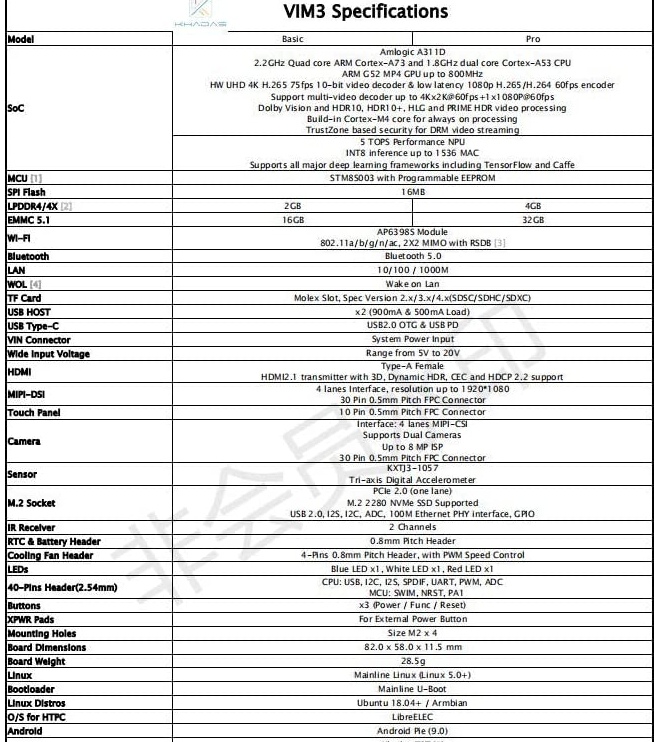
will this work with khadas VIM3? VIM3 has 30pin for screen and 10 pin for touch. connector fpc https://uploads.disquscdn.c...
JaneYu Hi, Sorry, it cannot be used with Khadas VIM3 due to the different pin interface. this is a 6pin touch screen interface and in the VIM3 specifications in mentions that it has a 10pin touch panel interface. So, I'm afraid this screen cannot be used with VIM3.
Is this screen compatible with rpi 4
JaneYu Sorry, it isn't compatible with pi 4.
Will this 7" Capactive Touch Pannel work on Linux Ubuntu for the LP 4GB/64Gb (SKU:DFR0419)?
JaneYu We will test this screen on LP Alpha, and we will release the driver later.
JaneYu How can i find a similar compatible screen ? Like a 1080por720p screen with phone screen size (10/14cm) ?
JaneYu What driver chip (IC) does this use for I2C interface?
JaneYu This display is not support I2C interface.
Are there Linux drivers for this touch panel that will work with Ubuntu Linux, or are Windows 10 the only drivers available?
JaneYu I am having a problem getting the driver installed. I just got my panda, screen and touch directly form you. I am trying to install/run as administrator. I am getting the following message when trying to install V1.1 install.bat ...
Start install GoodixTouchDriver...
Initialize the environment
The system cannot find the file specified.
The system cannot find the file specified.
Could not Find c\windows\inf\gt9*.bin
.\GT*.bin
The system cannot find the file specified.
0 file(s) copied.
copy TouchSetting.gt to c:\windows\inf
Access is denied.
0 file(s) copied.
GoodixTouchDriver installation failed !
Press any key to continue . . .
Any help is greatly appreciated!!
Thanks for the help!
Werner
JaneYu Have you tried v1.0 driver? what is the number on the side of pin sockets
I have a touchscreen and lattepanda and I can't seem to get the touchscreen to work. My LattePanda version is S70CR200-EECC34E but then my touch screen has a date of 2016/05/12 written on the flex cable. I also adhered it to the screen without testing it first. Anything else I can try to do to get it to work? The Goodix shows up as an input in my device manager without any errors or warnings. I'm pretty confident that the ribbon cable is inserted properly into the connector. How do I remove the panel if I need to replace it?
JaneYu Have you tried to upload the new driver to test it?
We have two versions of touch screen, if you bought the screen recently, V1.1 should be ok, besides, “install.bat” must be run as an administrator to avoid any error
JaneYu I have having trouble with the Latte Panda touch panel I ordered from you. Its not working at all.
The BIG issue is I like an idiot already glued it onto my screen which is working.
Is it possible I missed something to get it to work? I tired installing V1.1 drivers and still nothing.
Help
JaneYu Have you ever tried to install the v1.0 driver? Because the version of the driver is depends on your LattePanda, you can check the version of your LattePanda by the number on the side of pin sockets